Enterprise Resource Planning (ERP) systems help businesses manage operations such as sales, accounting, inventory, and human resources in a unified platform. One of the most popular open-source ERP systems today is Odoo.
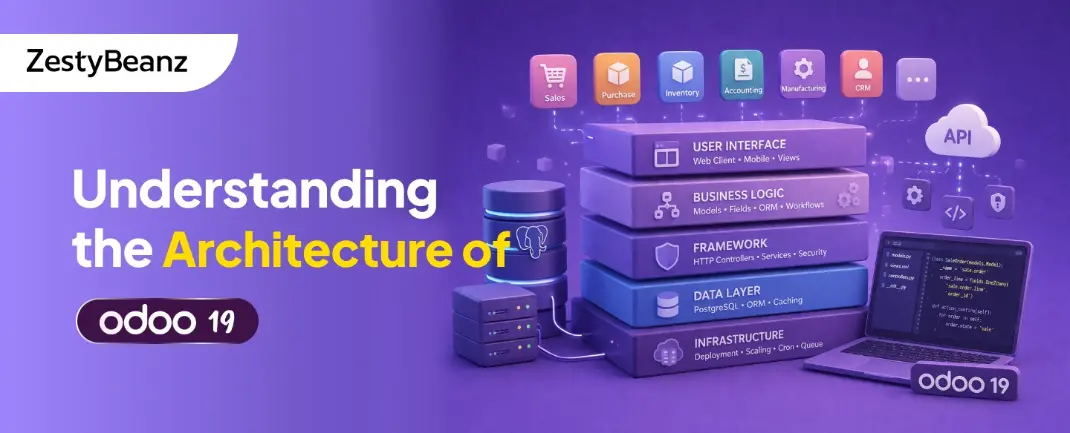
Odoo 19 continues to build on a powerful and modular architecture that allows developers to easily extend and customize applications. Understanding the architecture of Odoo is essential for developers who want to build custom modules, integrate external systems, or optimize performance.
This article explores the core architecture of Odoo 19, including its layers, key components, and how different parts of the system interact.
Overview of Odoo Architecture
Odoo follows a three-tier architecture, which separates the system into different layers to improve scalability, maintainability, and performance.
The three main layers are:
Presentation Layer (Client Interface)
Application Layer (Business Logic)
Data Layer (Database)
Each layer has a specific responsibility and communicates with the others to process requests and deliver responses to users.
Presentation Layer (Client Interface)
The presentation layer is responsible for the user interface and user interactions. It allows users to access Odoo through a web browser.
The Odoo web client is built using modern web technologies such as:
HTML
CSS
JavaScript
OWL (Odoo Web Library)
This layer displays different types of views including:
Form View
List (Tree) View
Kanban View
Calendar View
Dashboard Views
When a user performs an action such as creating a record or updating data, the request is sent from the web client to the application layer.
Application Layer (Server-Side Logic)
The application layer is the core of the Odoo framework. It handles all business logic and processes user requests.
Odoo's server is written in Python and manages communication between the user interface and the database.
Key components of the application layer include:
Models
Models define the structure of business objects such as customers, products, invoices, and sales orders.
Controllers
Controllers manage HTTP requests from the web client and return responses.
They are commonly used for:
Website routes
API integrations
Custom web features
Business Logic
Business logic is implemented inside model methods. These methods define how records are created, updated, or processed.
Examples include:
Calculating totals
Validating records
Automating workflows
ORM (Object Relational Mapping)
Odoo uses a powerful ORM that connects Python objects to database tables.
This allows developers to work with records using Python instead of writing SQL queries.
The ORM simplifies database operations and ensures consistency across modules.
Data Layer (Database)
The data layer stores all system data including records, configurations, transactions, and user information.
Odoo uses PostgreSQL as its primary database system.
Key advantages include:
Reliability
Scalability
Strong data integrity
Advanced query capabilities
Every Odoo model corresponds to a table in the PostgreSQL database, and the ORM manages communication between Python models and database tables.
Modular Architecture in Odoo
One of the strongest features of Odoo is its modular architecture. Each functionality is implemented as a module.
Examples of standard modules include:
Sales
Inventory
Accounting
CRM
Human Resources
Developers can create custom modules to add new features or modify existing functionality.
A typical module structure looks like this:
Each module contains the necessary files to define models, views, security rules, and business logic.
Request Flow in Odoo
Understanding how requests flow through Odoo helps developers understand how the architecture works in practice.
The typical request flow is:
A user performs an action in the web interface.
The request is sent to the Odoo server.
A controller processes the request.
The model executes business logic.
The ORM interacts with the PostgreSQL database.
The server returns the response to the client interface.
Benefits of Odoo Architecture
The architecture of Odoo offers several advantages for developers and businesses:
Modular and extensible design
Clean separation between UI, logic, and data
Powerful ORM for database management
Easy customization through modules
Scalable system for growing businesses
These features make Odoo a flexible ERP platform suitable for organizations of all sizes.
Conclusion
The architecture of Odoo 19 is designed to provide flexibility, scalability, and ease of development. By separating the system into presentation, application, and data layers, Odoo ensures efficient communication between components.
With its Python-based backend, modular design, and integration with PostgreSQL, Odoo provides a robust framework for building enterprise applications.
For developers, understanding this architecture is the first step toward creating powerful custom modules, integrations, and business solutions within the Odoo ecosystem.
If you are looking for an ERP implementation partner with diverse industry experience feel free to contact us. We have proven track record of successful implementations across various sectors including Odoo for Manufacturing, Odoo for Trading, Odoo for FMCG, Odoo for Oil & Gas, Odoo for Diary, Odoo for Pharma, Odoo for Cosmetic Clinic, Odoo for Contracting Companies, Odoo for HVAC, Odoo for Logistics, Odoo for Automobile, Odoo for Laundry, Odoo for Field Service, Odoo for E-Commerce & many more
ZestyBeanz offers Developer / Consultant outsourcing programs, Chat with us in Whatsapp and Hire Odoo Developers, Mobile Application Developers, Consultants.